Why is the Mileage Fees Calculation Wrong and Duplicate Passengers Showing on Journey Overview?
If you encounter duplicate passengers or incorrect mileage in a journey, it may be due to overlapping age groups. For instance, in the given example:
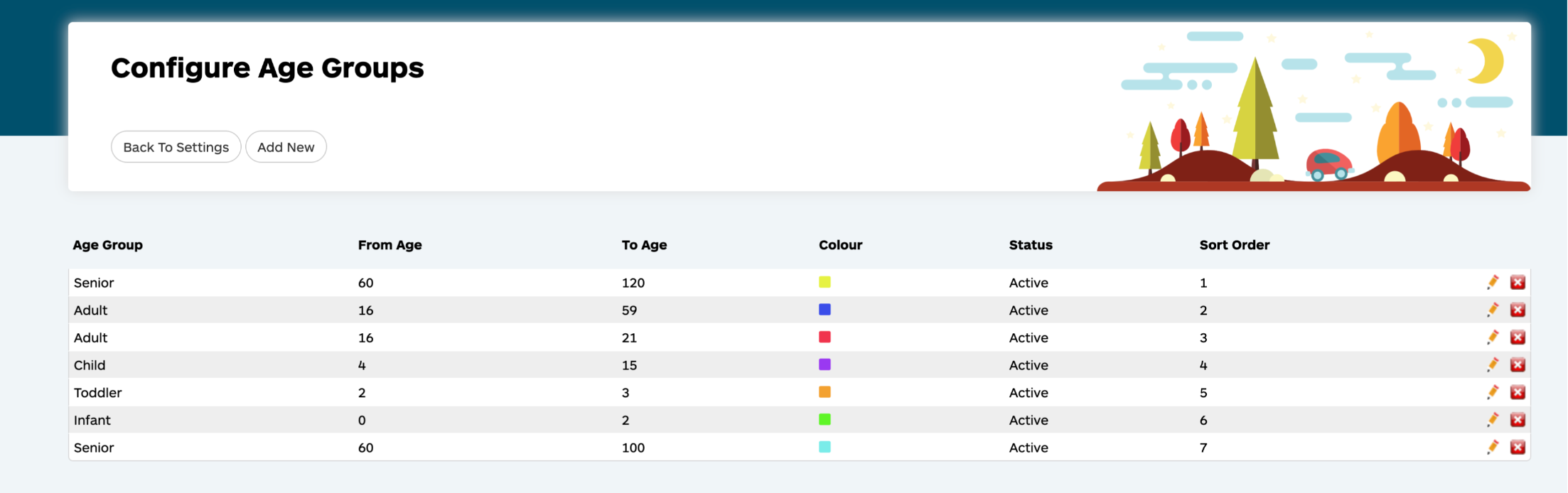
In this scenario, the senior age range at the bottom overlaps with the senior age range at the top.
- Senior is set at the top as 60-120 years and at the bottom set as 60-100 years.
This overlapping age group configuration would result in the duplication of passengers in the journey overview and lead to incorrect mileage and fee calculations.
Resolution:
To address this issue, it is important to ensure that age groups do not overlap. This can be achieved by removing any overlapping age groups or adjusting the age ranges to eliminate any overlap.
Incorrect Example:
- Senior: 60-105
- Senior: 60-120
It is important to note the overlap in the two senior age groups, as this may result in calculation issues and passenger duplication.
Correct Example:
- Senior: 60-120
- Adult: 21-59
- Student: 15-20
It is important to ensure that each age range is distinct and does not overlap.